

Introduction #
A new setting called “Use PV forecast” has been added under the Qilowatt Optimizer.
This setting allows you to decide whether the Optimizer should take solar production forecasts into account when making its calculations.
While this option is very useful in normal conditions, it requires special attention during the winter period.
This setting allows you to decide whether the Optimizer should take solar production forecasts into account when making its calculations.
While this option is very useful in normal conditions, it requires special attention during the winter period.
Why is this setting important? #
When Use PV forecast is enabled, the Optimizer includes solar energy production forecasts in its decision-making process.
During winter, situations may occur where:
• solar panels are covered with snow,
• panels are not cleaned regularly,
• actual production is significantly lower than the forecast.
In these cases, the forecast may not match reality and can negatively affect the Optimizer’s performance.
During winter, situations may occur where:
• solar panels are covered with snow,
• panels are not cleaned regularly,
• actual production is significantly lower than the forecast.
In these cases, the forecast may not match reality and can negatively affect the Optimizer’s performance.
If your solar panels are covered with snow during winter or are not cleaned regularly, we recommend disabling the PV forecast.
See muudab Optimizeri töö täpsemaks, stabiilsemaks ja Teie jaoks kasulikumaks.
Step-by-step Guide #
How to find and change the PV forecast setting
1. Open Qilowatt App.
2. From the left-hand menu, select “Addons” and klick “Optimizer”.
The Optimizer view will open:
1. Open Qilowatt App.
2. From the left-hand menu, select “Addons” and klick “Optimizer”.
The Optimizer view will open:
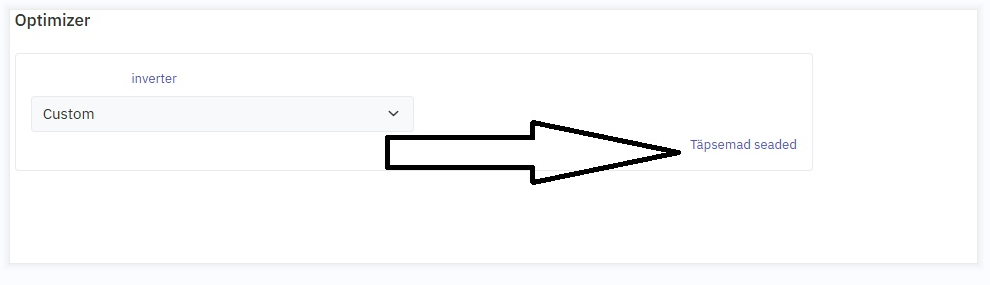
3. Find the section “Solar panels”.
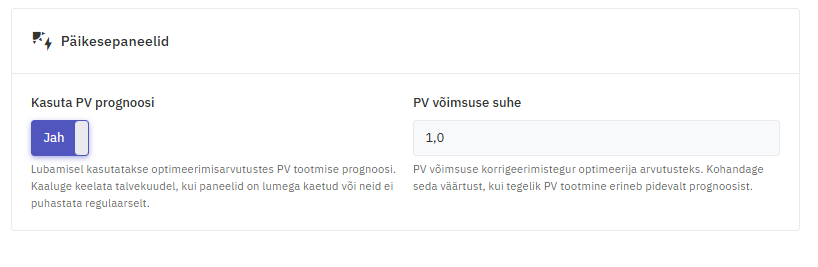
4. Enable or disable Use PV forecast as needed.
5. Klick “Save”.
5. Klick “Save”.
Result #
After saving, the Optimizer will:
• use solar production forecasts when the setting is enabled, or
• rely only on actual measured data when the setting is disabled.
Disabling the PV forecast during winter helps avoid inaccurate decisions and ensures reliable Optimizer performance.
• use solar production forecasts when the setting is enabled, or
• rely only on actual measured data when the setting is disabled.
Disabling the PV forecast during winter helps avoid inaccurate decisions and ensures reliable Optimizer performance.


